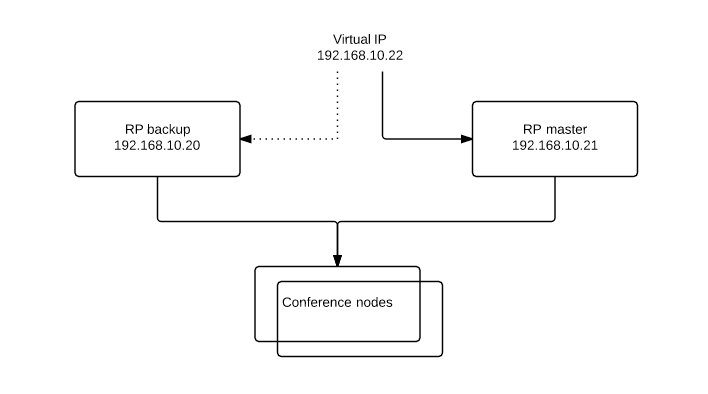
Here we advertise a virtual IP to web users (more likely a DNS record resolving to it). Installing keepalived on the RPs allows for one RP to be configured as a master while a second RP is waiting to step up in the event that the master fails. When the master comes back to life again, it will resume it’s role as the master.
sudo apt-get update
sudo iptables -I INPUT -d 224.0.0.0/8 -j ACCEPTsudo iptables -I INPUT -p vrrp -j ACCEPT
sudo service iptables-persistent save
sudo nano /etc/sysctl.conf
net.ipv4.ip_nonlocal_bind = 1
sudo sysctl -p
sudo apt-get install keepalived
sudo nano /etc/keepalived/keepalived.conf
vrrp_script chk_nginx {
        script "killall -0 nginx"
        interval 2
        weight 2
}

vrrp_instance VI_1 {
        interface eth0
        state MASTER
        virtual_router_id 1
        priority 100                    # 101 on master, 100 on backup
        virtual_ipaddress {
            192.168.10.22           # this is the shared virtual IP address
        }
        track_script
            chk_nginx
        }
}
sudo service keepalived start
For TURN, configure the /etc/turnserver.conf file the same way for both the master and the slave. Example for a TURN server has an internal ip and a NATed public IP:
NAT IP: 203.10.10.10
Internal IP: 192.168.10.22
# Config generated by Pexip RP
listening-ip=192.168.10.22
external-ip=203.10.10.10
realm=pexip.com.au
lt-cred-mech
no-tls
no-dtls
no-loopback-peers
no-multicast-peers
stale-nonce
#proc-user=turnserver
#proc-group=turnserver
#no-cli
no-stdout-log
syslog
userdb=/etc/turnuserdb.conf
inet 192.168.10.21/24 brd 192.168.10.255 scope global eth0inet 192.168.10.22/32 scope global eth0
ip addr sh eth0 | grep 'inet'
inet 192.168.10.20/24 brd 192.168.10.255 scope global eth0
sudo service nginx stop
ip addr sh eth0 | grep 'inet'
inet 192.168.10.20/24 brd 192.168.10.255 scope global eth0
inet 192.168.10.22/32 scope global eth0
sudo service nginx start
 Dennis Lorist
One thought on “Making NGINX Reverse Proxy and TURN Highly Available”